Statements
see what’s new with our products
A Message From Our Team
Happy October! 🎃 Fall into our latest batch of updates designed to make managing your financial institution even smoother. This month, we're excited to highlight new features for the Banno Support app case queue, seamless browser-based key generation for developers, the launch of our new Origination Pilot & Beta Hub for lending and deposits, and so much more. Dive in below to see what's new!

Issued Items File Activity for Positive Pay
We're pleased to announce a new enhancement to Treasury Management Positive Pay designed to streamline fraud prevention and reconciliation workflows. The new Issued Items File Activity page will be available the evening of April 30, 2026.
What’s New
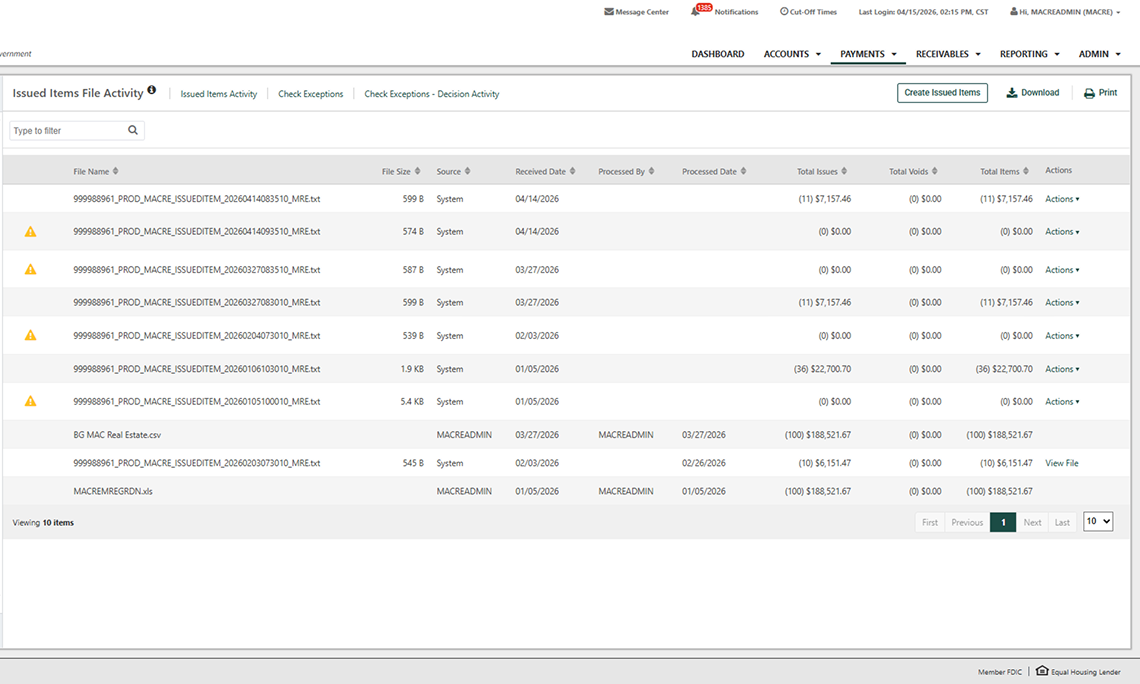
To provide greater visibility into issued item files, the Issued Items File Activity page provides a centralized view of all issued item file submissions. Once files are successfully uploaded, authorized users can quickly access:
- File details including file name, size, source, and processing user
- Transaction totals for checks, voids, and overall dollar amounts
- Timeline tracking with received and processed dates for each submission
To enhance management and research, the new page also gives you more control and efficiency when managing issued items:
- Interactive actions to review raw file data
- Improved search and research using a flyout filter to locate files by name, source, date, or total amount
What You Need to Know
If Allow Issued Items Activity is enabled and users are entitled to Create Issued Items, the new page will automatically display upon release on April 30, 2026.