Statements
see what’s new with our products
A Message From Our Team
Happy October! 🎃 Fall into our latest batch of updates designed to make managing your financial institution even smoother. This month, we're excited to highlight new features for the Banno Support app case queue, seamless browser-based key generation for developers, the launch of our new Origination Pilot & Beta Hub for lending and deposits, and so much more. Dive in below to see what's new!

Mobile App UX Design Evolution
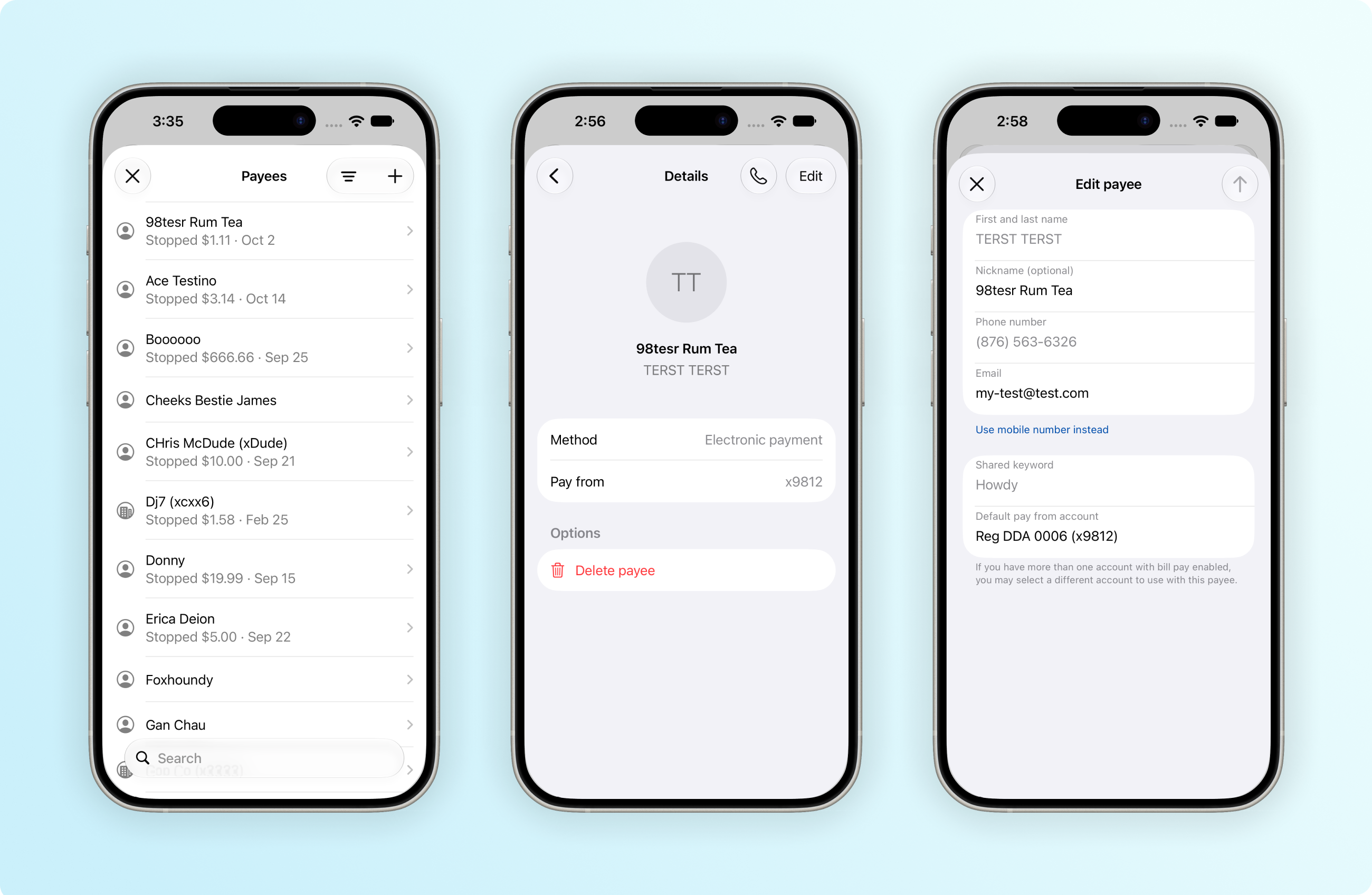
As you read last month (and in an SLA we sent on Oct. 14), we will enable Liquid Glass with Banno Mobile 3.40 on iOS. Currently on track to hit App Stores in the second week of November, the 3.40 release will also bring an update to the minimum supported OS version on both iOS and Android:
- iOS: The new minimum supported OS for iOS devices will be iOS 26.3, which is compatible with the iPhone 11 and all newer models.
- Android: The new minimum supported OS for Android devices will be Android 11.0, which is supported across compatible Google Pixel and OEM devices.
- Reminder: Accountholders on older devices will maintain access via mobile browsers.
For more details on the UX design changes expected with Mobile 3.40, continue reading.
iOS App
Along with the official adoption of Liquid Glass, Banno Mobile 3.40 on iOS will come with a few final UX refinements to buttons and cards. This includes consistent labeling and icons in the toolbar as well as expanded use of rounded corners.
As you can see in the image above, the Bill Pay screens will also receive final updates to embrace Liquid Glass standards. The Payees screen will feature convenient search functionality and simplified sorting. The payee Details screen will be modernized with streamlined navigation and a decluttered layout, and accountholders will be able to delete payees more quickly.
You can read – and see! – additional details in the iOS App UX Evolution Knowledge Base doc.
Liquid Glass Enablement
As a reminder, once we enable Liquid Glass with the release of Mobile 3.40, we can no longer deploy with the legacy design system. This is one reason we’ve broadly communicated our mobile app UX evolution changes so often while strategically adopting new themes and layouts over many months.
Enabling Liquid Glass lets us better support new iOS products. For example, it will simplify the work needed to support the new iPhone Duo. This article explains how the process works and what to expect in the meantime. Our engineers are actively optimizing for Duo. While we don’t have a specific version to announce, we are targeting no later than our February 2027 release.
Liquid Glass also lets your accountholders adjust the design system’s opacity. To adjust Liquid Glass opacity, they can follow these steps:
- Open the Settings app on the iPhone or iPad (or System Settings on Mac).
- Tap Appearance (or click Display on Mac).
- Select Liquid Glass.
- Drag the continuous slider – left for a clearer, more transparent look or right to increase the tint and make the elements more opaque.
We hope you share our excitement for Liquid Glass. Adopting the native design system will help maintain consistency with standard components throughout the app and further ensure that users trust your digital banking app to continually evolve with the operating system as a whole!
Android App
Banno Mobile 3.40 will mark a change to how we theme newly designed screens moving forward. Accountholders will start to notice higher contrast and more consistent layering between sections on each screen. Though most related updates will be subtle, this work will greatly improve accessibility in key areas of the app.
To see an example screenshot of the new theme colors, visit the Android App UX Design Evolution Knowledge Base page – where you can also read the plan for Mobile 3.41 and beyond.